Every article on Sociale, from the News to the Gossip, now has two new things at the bottom: reactions, to say what you think in one tap, and Support the author, to thank whoever wrote it with coins or XP. And whoever supports an article is shown below it, in the Supporters list.
React to every article
Under every article you find the same reactions as the posts in the feed: Stellar, Legend, LOL, Hug, Shook, I’m in!, GG, Sus and Nope.
- One tap gives a Stellar (our “like”).
- Keep it pressed on the phone, or move the mouse on it on the computer, to choose another reaction.
- Tap your reaction again to take it away. One reaction per person for every article.
- Next to the button you see the three most used reactions with how many people chose them. Tap them to see who reacted.
Support who writes
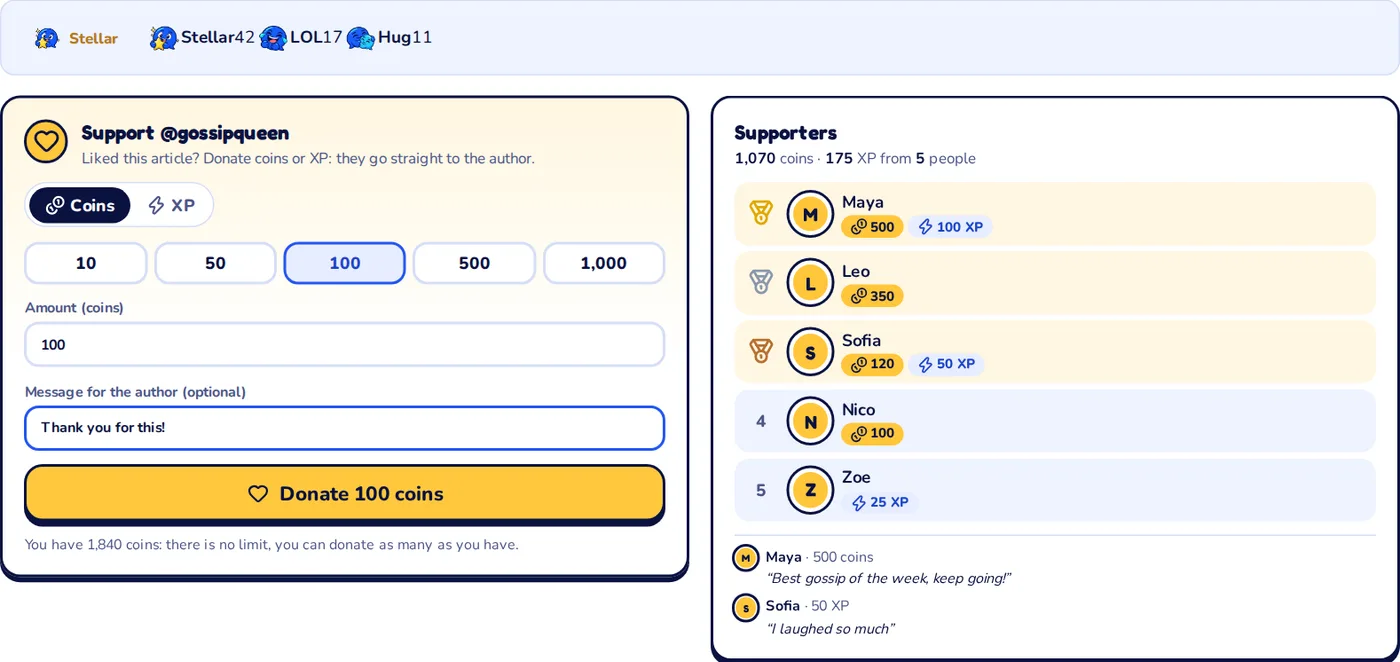
Liked a news or a gossip? In the Support @author box you can donate to whoever wrote it:
- Choose Coins or XP.
- Choose how much: 10, 50, 100, 500, 1,000, or write any amount.
- If you want, leave a message for the author (up to 140 characters).
- Press Donate. The author gets a notification with your name, the amount and your message.
Coins: no limit
You can donate as many coins as you want, as long as you have them: the box shows your balance. They go from your account straight to the author’s account, at once.
XP
XP donations are real xat XP: they go from your xat account to the author’s, through MewBots. You need an active Sociale Card (you and the author too), and you can donate only the XP you can spend. MewBots daily gift limits apply: if you reach them, you can donate coins or try again the next day. If something goes wrong, nothing is taken from you.
The Supporters
Next to the box you see who supports the article:
- the total raised, in coins and XP, and how many people donated;
- the list of supporters, whoever gave the most at the top, with a medal for the first three;
- the latest messages left by the supporters.
It is a way to say thank you, and to show the authors that what they write matters.
Want to write too?
Gossip is written by members of the community. If you know the stories of the room better than anyone, apply to write the gossip: you get the Gossip Writer badge, and now also the support of your readers.
Questions
Who gets the donation? The author of the article, the person shown as “by” at the top. Can I donate to my own article? No: on your articles you see who supports you. Is there a fee? No. Can I take a donation back? No, so check the amount before you press Donate.